

You can cancel a place yourself, as long as it is still early enough under your club’s cancellation rule. Each programme has its own rule, which you were shown when you booked.
When you cancel a place you have paid for, the money becomes credit on your account. It is taken off your next booking automatically. If you would rather have the money back, ask the club.

Cancel a place

1

Find the booking

Go to Bookings and press View sessions on the booking.
2

Press Cancel place

Next to the place you want to cancel.
3

Check what it means

Before anything changes, you are told what happens to your money. For example, “£18.00 will be added to your account credit, and taken off your next booking automatically”, or what your new total will be.
4

Confirm

Press Yes, cancel this place. To change your mind, press Keep it.
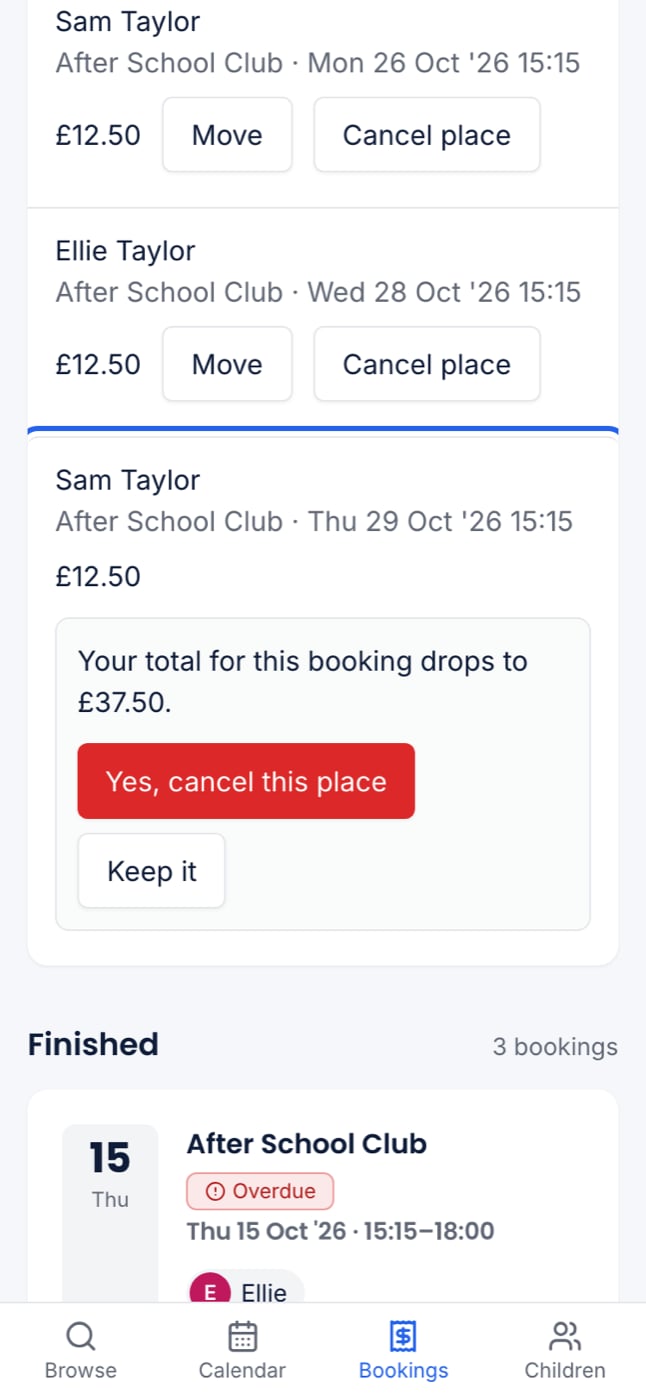
The cancel confirmation at 375px, showing the new total for the booking and Yes, cancel this place
The place is released straight away, so the club can offer it to another family. You and the club are both emailed, so you have a record that you cancelled in time.

What happens to your money

When you cannot cancel online

In each case, contact your club. The club can still cancel a place for you.
If you only need a different day, try moving the place instead. See Moving to another date. The same deadline applies.

When the club cancels a session

If the club calls off a session, you are emailed. The email says what happens to your money: card payments may go back to your card, which takes 5 to 10 working days, or the money may become credit. The session stays on your calendar, marked Cancelled.