

A waiting list is an alert, not a queue. Joining does not hold a place for you, and there is no order.
Join a waiting list
1
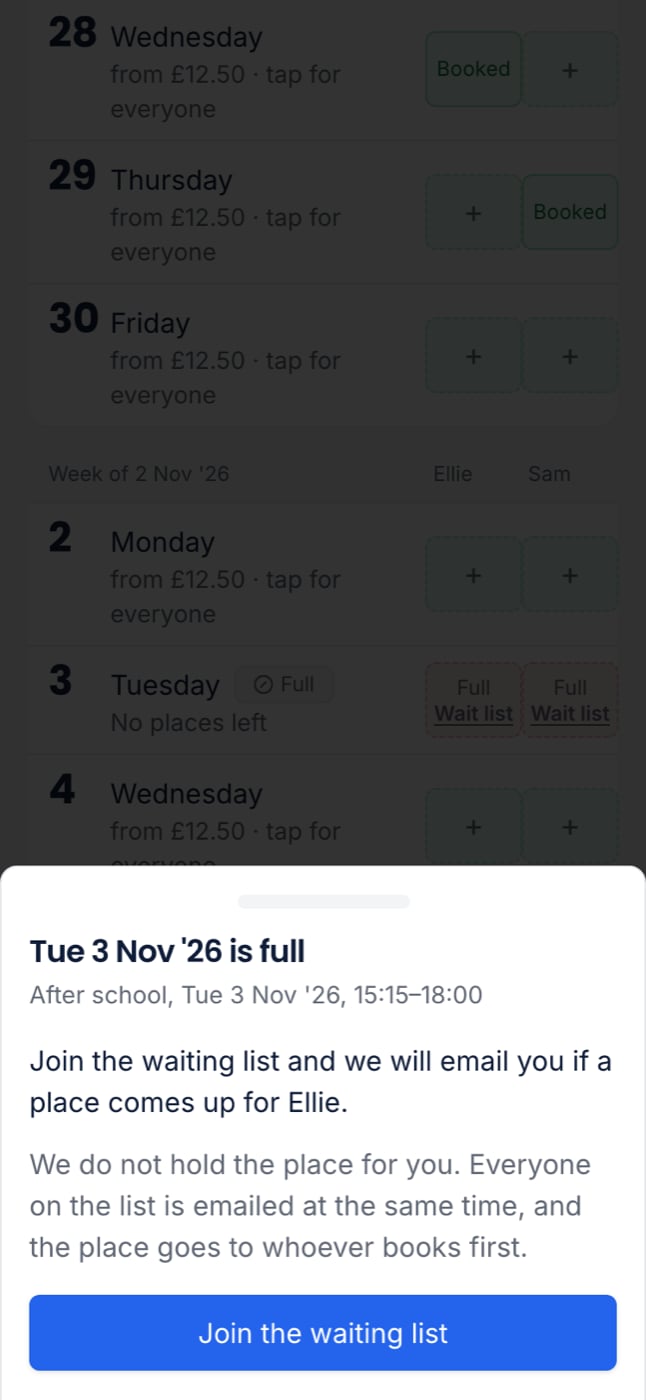
Find the full day
On the programme’s grid, a full day says Full, with Wait list under it.
2
Tap it and join
Tap the square, then Join the waiting list. The square now says Full · Waiting.
When a place comes up
About two minutes after a place frees up, you get an email: “A place has come up”, with the programme, date and time, and Book now. Book as soon as you can. The place goes to whoever books first.- With two children waiting, you get one email naming both.
- If your child’s other parent can also book for them, they get their own email.
- You still get this email if you have turned off booking emails from the club. You asked for it.
Leave a waiting list
- From the club’s page: open Bookings. Your lists are under Waiting lists. Press Leave.
- From the programme: tap the square and choose Leave the waiting list.
- From the email: follow Leave this waiting list, then press the button to confirm.
When you cannot join
- The day has places left. Just book it.
- Booking has closed for the date. Nobody could be emailed in time to book it.
- Your child already has a place that day, or the programme is not for them, for example their age or school.