

The four things that change the answer
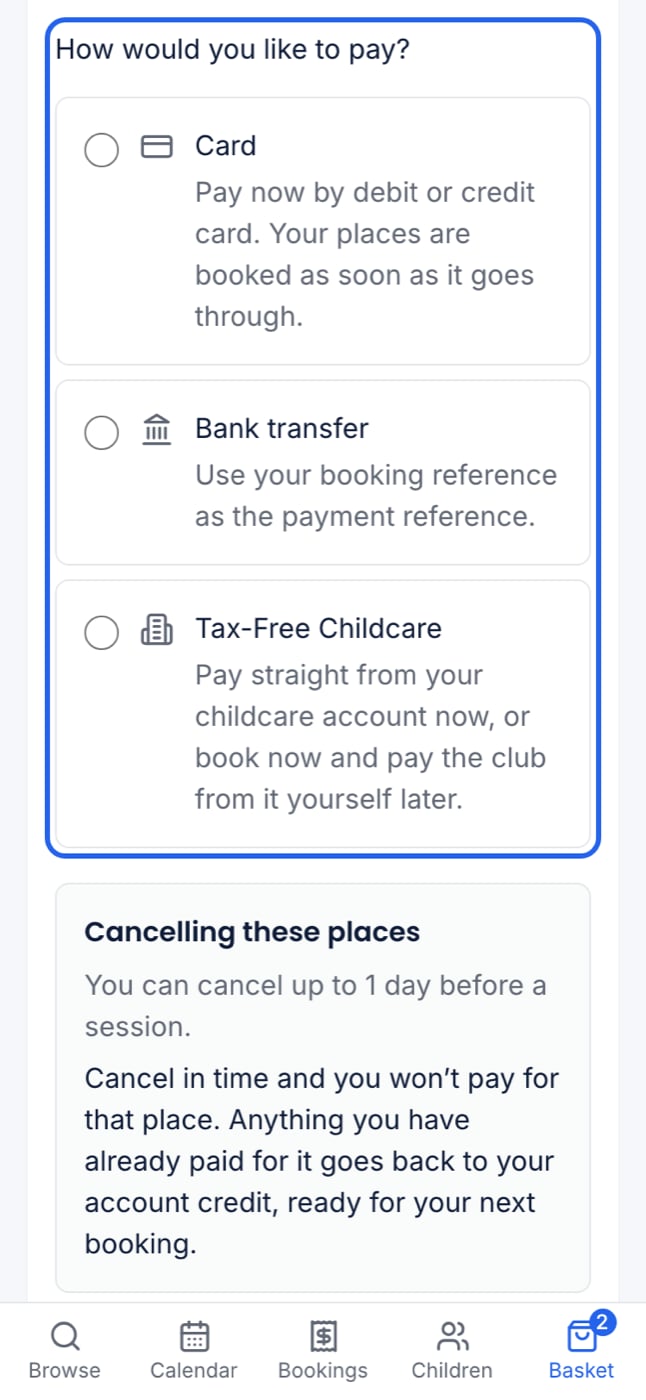
What a parent is offered at checkout
A booking paid by card or online Tax-Free Childcare is made only once the payment goes through. Every other method books the places straight away, and the family owes the amount until it arrives.
Recording money that arrives
With Xero or QuickBooks connected, you record payments in your accounting software, not in ClubDock. Record a payment is not offered on a booking, and ClubDock reads each payment back onto its booking.
- Card and online Tax-Free Childcare are recorded for you, labelled ClubDock Pay.
- Bank transfer, childcare vouchers, cash and cheque are recorded by hand on the booking. See Payment methods.
- Account credit is spent automatically at checkout, oldest first, before the parent is asked for anything.
Part payments and overpayments
- A parent who pays £10.00 of £18.00 is Part paid, with £8.00 outstanding. A penny short is still part paid.
- A parent who pays too much keeps the extra as account credit, called Overpayment on CD-…. It is spent on their next booking.
- A booking that stays unpaid never loses its place automatically. Whether to cancel an unpaid place is your decision, under your own terms. See Money owed to you.
When places are cancelled
Credit is the default. Giving money back is a separate step that only a Manager can take. See Credit and refunds.
Where to go next
Payment methods
Choose how parents can pay, and what they are told.
Card payments with ClubDock Pay
Set up your Stripe account and take cards at checkout.
Tax-Free Childcare
Take childcare-account payments when parents book.
Money owed to you
See who owes what, and chase it.