

Only a Manager can set how parents book a programme.
The two ways
Picking dates
The parent sees a calendar of the dates on sale and taps the ones they want for each child. They can book Monday and Thursday only, or every Monday at once by tapping the weekday.Booking the whole block
The parent sees Who is going? and the line “This is booked as a whole block: every date below, or none.” The dates are listed to read, with their times and prices, but can’t be tapped. For each child they choose Book with that child’s name, and the total for the block appears. Joining partway through a term is pro rata: the block is the dates still on sale. A child who already holds some of the dates gets the rest. See Booking a whole block for what parents see.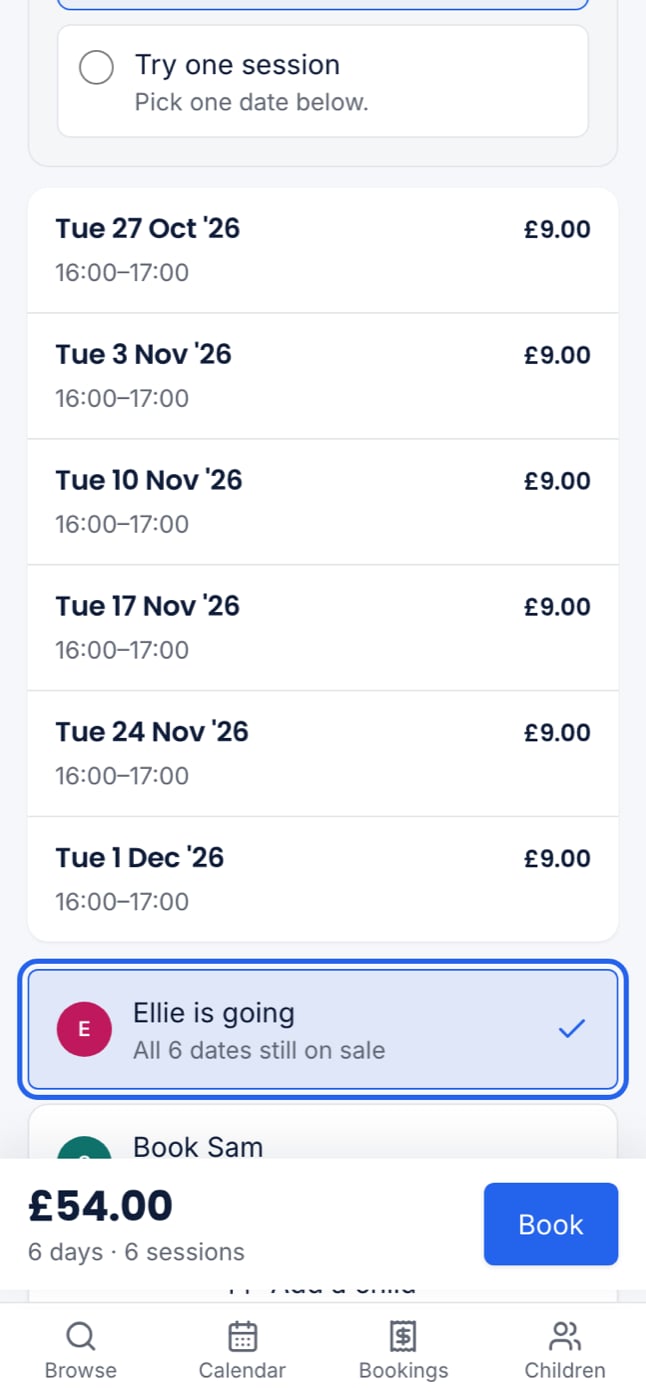
Once a programme is live
How parents book and the Cancellation policy are fixed while the programme is live. On the overview they read Fixed while live, with a lock where Edit would be. Places already booked are cancelled and moved under these rules, so changing them would change the deal for parents who have already paid. To change either one, unpublish the programme first. See Preview and publish.Offer a trial session
A whole-block programme can let a family try one session before booking the rest. It’s offered once per child, per programme.1
Open the programme's overview
Under Booking rules, the Trial session row says “Not offered — families book the whole block”.
2
Press Add and switch on Offer a trial session
Leave Trial price empty to charge the session’s own price, early bird included. Enter £0.00 to make it free.
3
Save
The row now says what is set, such as “Free, once per child” or “£8.00, once per child”.
What families see
- The programme’s price box says what the trial costs, such as “Trial session: free” or “Trial session: £8.00”.
- For each child who hasn’t had a trial, the parent chooses Book the whole block or Try one session, then picks one date.
- The place is marked Trial session in the basket and on your register.
Rules for trials
- Discounts and promo codes never apply to a trial. A trial doesn’t count towards “3 or more sessions”, and doesn’t make a brother or sister “the second child”.
- A child who already has a place on the block isn’t offered a trial.
- If the child is marked absent at their trial, or the trial is cancelled before it runs, they can try another date.
- A trial can’t be moved to another date. The parent cancels it (in time) and books another.
- If you switch the trial off while a family has one in their basket, checkout refuses that place and lets them book the rest.
The email after a trial
When the child is signed in at their trial, each parent who can book them gets one email that evening, at 19:00 (or two hours after the session ends, if that is later). It asks how the child got on and shows the rest of the term as it would be booked now. No email goes if the child was marked absent, if nobody took the register, if the family has already booked the block, or if nothing is left on sale.Parents who have switched off booking emails from your club don’t get the email after a trial. See Booking emails.