

Programmes are a Manager’s screen. Staff who are not managers don’t see Programmes in the menu, and a link to a programme’s page tells them only managers can change programmes.
The order to set things up
1
Add a cancellation policy
Every programme needs one, so you can’t create a programme until at least one exists. See Cancellation policies.
2
Create the programme
Name it, choose how parents book it and who can book it. See Create a programme.
3
Add its dates and prices
Pick the days it runs and the sessions parents choose between. See Sessions and dates and Prices.
4
Check it and publish
Preview the page as a parent sees it, then put it on sale now or on a date you choose. See Preview and publish.
The Programmes list
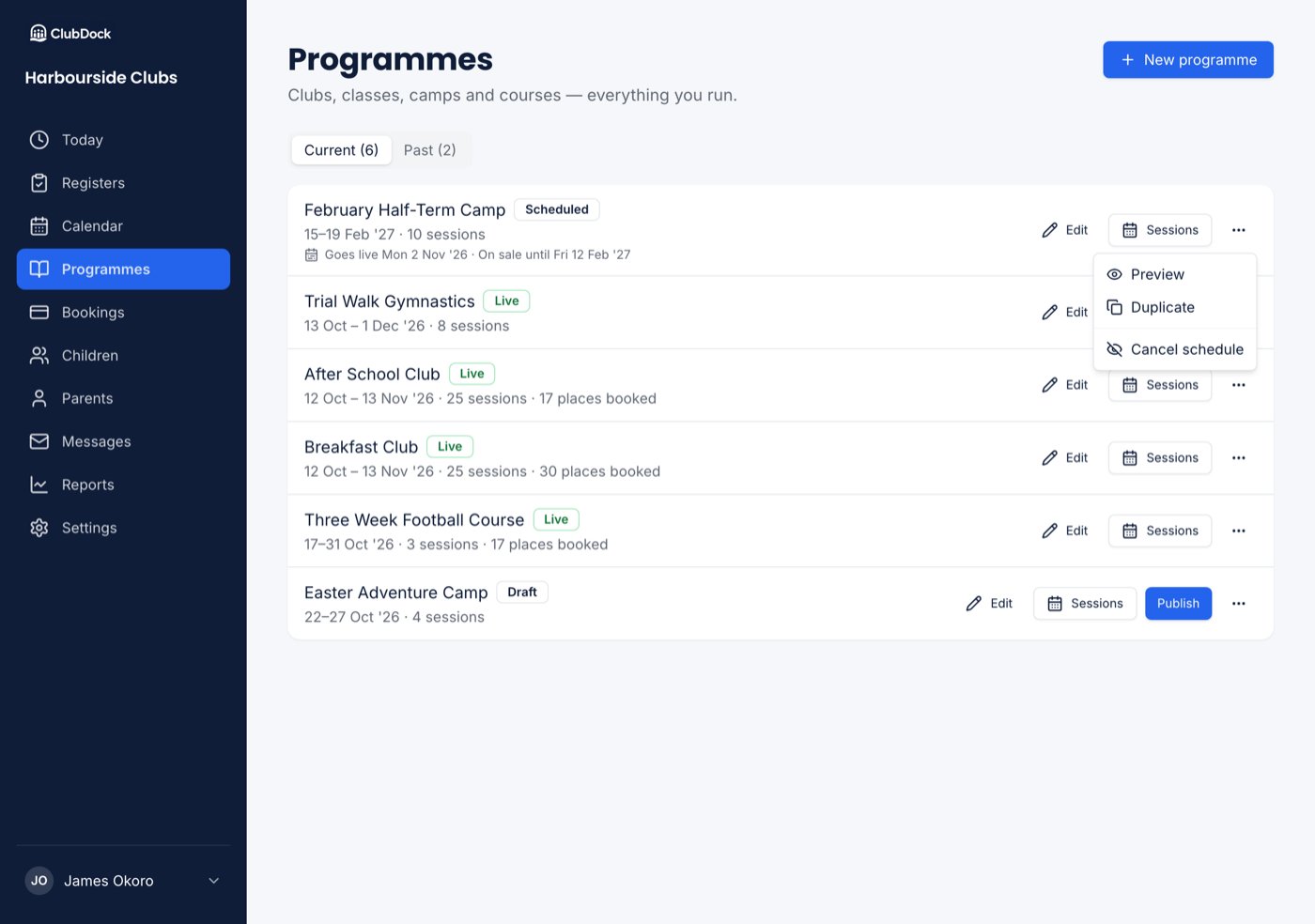
Go to Programmes to see everything your club runs. Each row shows how many sessions it has and how many places have been booked, such as “30 sessions · 10 places booked”. A row also says when a programme is scheduled or only selling some dates: “Goes live 10 Aug”, “On sale until 15 Aug” or “Selling 1–30 Sep”. What a row offers depends on where the programme stands:
A programme with no dates yet shows Add dates in place of Sessions. You can’t publish, preview or duplicate it until it has dates.
A programme’s overview
Press Edit on a programme to open its overview. It reads out everything that is set, in words, and you change each part on its own, with its own Save:- Publishing: whether it’s on sale, and when it goes on or comes off sale.
- Booking rules: the name, how parents book it, who can book, the venue, the cancellation policy and, for a whole block, a trial session.
- Dates and prices: each session’s name, times, price and places, with Edit dates and prices.
- What parents read: the tagline, photos, description, Need to know and What to bring.
- Discounts: what applies to this programme, read-only. You change them in Settings → Discounts and codes.
- Booking emails: the booking-open email and the reminder before booking closes.
Create a programme
Start from a breakfast club, after school club, holiday camp, weekly class or course.
How parents book
Picking dates, booking the whole block, and trial sessions.
Sessions and dates
Choose the days it runs, the sessions on each day, extras and places.
Prices
Session prices, early bird prices and sales.
Discounts and promo codes
Money off for more sessions, brothers and sisters, and codes.
Charges
Late collection, a lost jumper, and other charges after booking.
Cancellation policies
When parents can cancel their own places.
Preview and publish
Check the page, then put it on sale now or later.
Booking emails
Tell families when booking opens, and remind them before it closes.